I’ll admit it — like many developers, I spent years blindly using NPM. It got the job done, sure, but somewhere along the way, my projects grew, dependencies multiplied, and node_modules started feeling like a black hole. That’s when I discovered PNPM, and it changed everything.
Table of contents
Open Table of contents
The Problem with NPM’s Flat Architecture
When you run npm install, NPM downloads and copies the packages into a flat node_modules directory. If you have ten different Next.js or Astro projects on your local machine, you have ten separate copies of React, Tailwind CSS, and every other shared dependency.
This leads to two massive issues:
- Disk Space Hemorrhage: Gigabytes of redundant data clogging up your drive.
- Phantom Dependencies: Because NPM flattens the dependency tree, your code might accidentally rely on a package that another dependency brought in, even if you never explicitly installed it in your package.json. This often causes builds to fail unexpectedly in CI/CD pipelines.
The PNPM Solution: Content-Addressable Storage
PNPM fundamentally changes how dependencies are stored. Instead of copying files into every project, it uses a single global content-addressable store and creates hard links and symbolic links (symlinks) to your project.
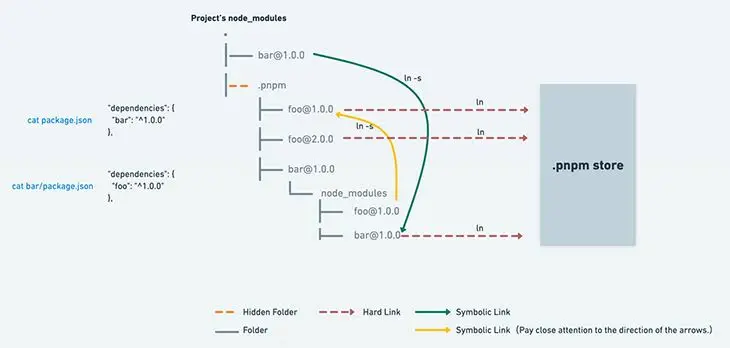
If you have fifteen projects using Next.js, the framework’s files exist exactly once on your hard drive.
To see exactly how this impacts resources at scale, try adjusting the parameters in this simulator based on your own project load:
Experience “Triple-Threat” Structure
PNPM’s CLI is fast, intuitive, and packed with helpful commands:
pnpm install       # lightning-fast installs
pnpm update        # easy updates
pnpm audit         # security checks
pnpm add <pkg>     # add dependencies effortlessly
Migration Made Simple
Worried about switching? Don’t be. PNPM is fully compatible with existing NPM projects. A simple command:
pnpm import
…translates your package-lock.json into a PNPM-friendly setup. Your project stays intact, and you gain all the benefits instantly.
For anyone hesitant to switch, this is reassuring — the learning curve is minimal, and the payoff is immediate.
Why PNPM Feels Like Magic
PNPM solves these common problems elegantly:
- Global store: PNPM Packages are downloaded once and reused across all projects.
- Symlinked
node_modules: Projects link to the global store instead of duplicating files. - Fast installs: Linking is almost instantaneous.
NPM vs. PNPM Disk Usage
| Feature | pnpm | npm |
|---|---|---|
| Speed | ⚡ Fast (up to 3x faster) | 🐢 Slower for large projects |
| Disk Usage | 💾 Extremely efficient | 🛑 Can be bloated with duplicates |
| node_modules | 🧹 Clean, strictly managed | 📦 Cluttered, allows phantom dependencies |
Why I’ll Never Go Back…!
I still remember the first time I ran pnpm install on a project and watched it finish in a fraction of the time NPM would have taken. It felt like magic. Disk space reclaimed, fewer bugs, faster installs, and stricter dependencies—it’s everything I needed.
NPM served us well, but for modern, scalable JavaScript development, PNPM is the clear winner. If you want speed, efficiency, and reliability, give it a try — you might never go back either.
Send in your thoughts in the comments below! See you in the next one. Cheers, have a nice day!
Efficiency isn’t just speed — it’s reliability, maintainability, and peace-of-mind. ⚡